What a checkpoint asks for
A commercial vehicle on a Nigerian road is expected to carry a current vehicle licence from the state Vehicle Inspection Office, a roadworthiness certificate, proof of insurance, and a driver with a valid licence — plus, for commercial use, the permits the state or local government requires. Each runs on its own yearly cycle, issued on a different day, so in a fleet of even ten vehicles something is always close to lapsing.
Putting the papers on file
- Open Certificates and pick the document type.
- Drop a photo of the paper. A VIO paper is read automatically — owner, registration, chassis, issuing state and dates — and you correct anything the photo garbled.
- For other papers, type the number and the dates beside the photo, or enter them with no photo at all.
- Attach it to the vehicle, or for a driver’s licence, to the driver. Save.
How the reminders work
| When | What happens |
|---|---|
| 7 days before expiry | A “Document expiring” alert, by email and in the app, naming the paper, the vehicle or driver, and the date. |
| The day it lapses | A “Document expired” alert: a vehicle paper should keep the vehicle off the road; a driver’s licence should keep the driver from driving. |
| After renewal | Edit the expiry date. The new date re-arms both reminders for the next cycle. |
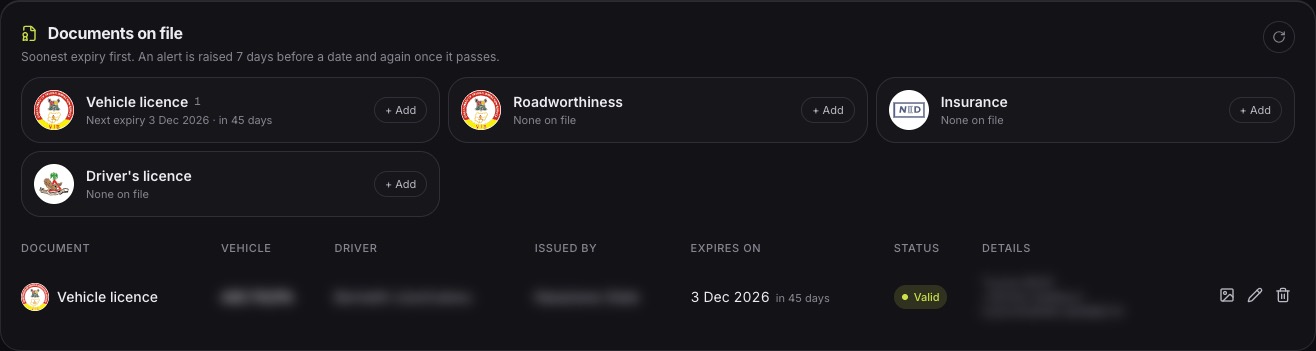
Each reminder is raised once per document, not every night until someone acts, so the alert list stays readable. The documents page shows every paper soonest-expiry first, with a card per type that turns amber when one is expiring and red when one has lapsed.
What a missed date costs
An expired paper is rarely just a fine. A vehicle held at a checkpoint loses the rest of its working day, a driver loses hours getting it released, and a delivery or a client is let down. An expired insurance policy turns a small accident into a cost the business carries alone. A reminder a week ahead turns all of that into a ten-minute errand.
Ten vehicles, four papers each
- Expiry dates to watch in a year
- 40
- Driver’s licences on top
- 10
- Reminders FuelSense raises before each lapses
- 50
- Dates someone has to remember
- 0
One vehicle licence, roadworthiness certificate and insurance policy per vehicle each year, plus a licence per driver; some papers run longer than a year.
Common questions
- Who receives the expiry emails?
- The addresses set for alerts under Settings → Notifications; managers can switch document alerts on or off there.
- Does it read insurance certificates automatically?
- Not yet. Automatic reading is built for the VIO paper layout; other papers are filed with their photo and the dates typed in.