Why mileage-based reminders slip
Most fleets track servicing in a notebook or a spreadsheet, keyed off a mileage someone wrote down at the last visit. Nobody re-reads the dashboard every week, so the reminder only happens when a driver notices a warning light. A tracker already measures every kilometre; the service schedule just has to read it.
How the schedule works
- Each vehicle has services — oil and filter, tyres, brakes, and any you add — each with a distance interval, a time interval, or both.
- The Service record shows, per service, the distance and days since it was last done and how much of the interval is used, as a bar.
- Within 500 km or 14 days of due, a “Service due soon” alert is raised; past the interval, “Service overdue”. Each is raised once per interval.
- Logging the service (date, odometer, what was done, cost) closes it and starts the next interval from that point.
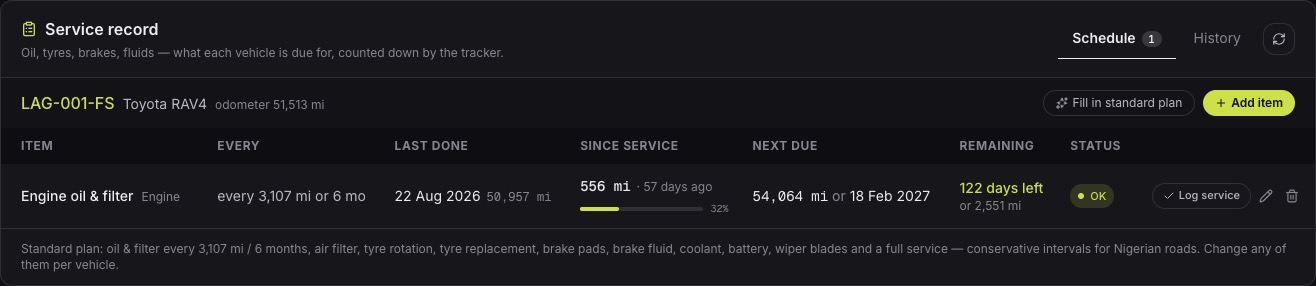
Because distance comes from the anchored odometer, a 5,000 km oil change falls due at the dashboard mileage the mechanic expects. See the odometer guide for anchoring.
What on-time servicing saves
- Fuel: clogged air filters, worn plugs and under-inflated tyres all raise consumption, and a fleet pays for that on every receipt until the service is done.
- Breakdowns: a vehicle off the road earns nothing and often strands a driver and a load with it.
- Engines: oil left too long is the cheapest way to turn a routine service into an engine repair.
- Over-servicing: a reminder at the real interval stops oil being changed early “to be safe” on every vehicle.
The schedule also shows what was spent: every logged service carries its cost, so the service bill per vehicle sits next to its fuel bill, and the vehicle that costs more than its twins is easy to spot.
Common questions
- What if the tracker was offline for part of the interval?
- Re-read the dashboard odometer when it is back. The missed distance is booked, so the service schedule counts it.
- Can I set my own intervals?
- Yes. Each service’s distance and time interval can be changed per vehicle, to match the manufacturer’s schedule or your mechanic’s advice.