Why the two numbers differ
The car’s odometer has been counting since the car left the factory. A tracker fitted last month has only seen last month. Both are right; they are measuring from different starting points. The tracker’s own count is precise — on the reference vehicle FuelSense runs on, tracker distance agreed with the dashboard to within a fraction of a percent over hundreds of kilometres — but it cannot know the miles that happened before it was there.
Anchor it once
- Park, switch the ignition on and read the odometer on the dashboard. A phone photo of the cluster is the easiest record.
- In FuelSense open Settings → Vehicle odometers and press Update beside the vehicle.
- Enter the reading in the unit the dashboard shows (miles or kilometres).
- Save. The anchor is stored with the moment you set it and who set it, and shows as “Anchored on … at …”.
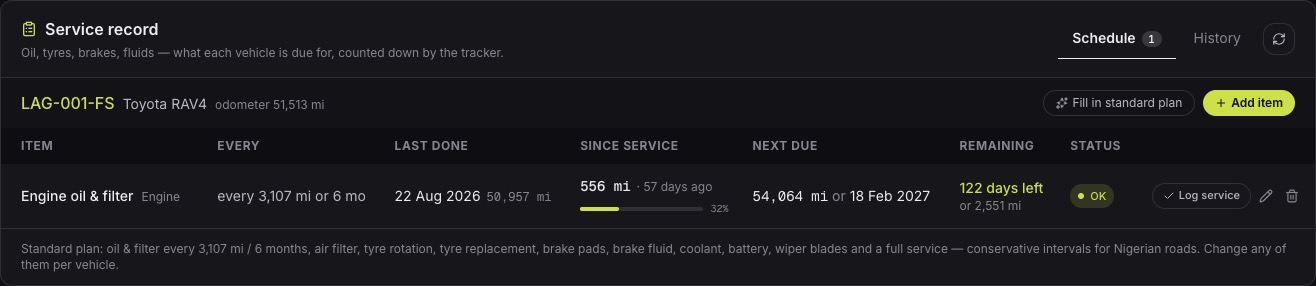
From then on the mileage shown for the vehicle is the anchor plus every kilometre the tracker has measured since. It moves as the car moves, and it should match the dashboard whenever you glance at both.
What the anchor drives
- Service intervals: “oil change every 5,000 km” is measured from the anchored odometer, so a reminder fires at the dashboard mileage the mechanic would expect.
- Distance between fills: the kilometres between two fuel receipts, which is how much fuel a vehicle should have needed.
- Fuel estimates: litres are modelled from distance, so a missed stretch of distance would mean missed litres.
Why a wrong odometer costs money
- Services fall due at the wrong mileage: too early wastes oil and labour, too late wears the engine.
- Distance between fills reads short, so every receipt looks more expensive than it is and honest drivers get questioned.
- Fuel estimates miss whatever distance was not counted, so the tank and the reports drift away from the real car.
- A buyer asks for the maintenance history at the dashboard mileage; an unanchored tracker cannot give it.
After the tracker has been offline
If the tracker loses power or signal for a while, it cannot measure what the car did in that time. Re-read the dashboard when it is back. FuelSense compares the new reading with what it expected, books the difference as distance the tracker missed, and charges it to the virtual tank at the vehicle’s own rate — so the tank, the service schedule and the reports stay true to the car instead of quietly drifting short.
Common questions
- How often should I re-read the odometer?
- Once at installation, and again after any tracker outage of more than a day. Otherwise the tracker keeps it in step on its own.
- My dashboard shows miles. Does that matter?
- No. Enter the reading in the unit the dashboard shows; FuelSense stores the vehicle’s unit and displays mileage in it.
- Can a driver change the odometer anchor?
- Anchors are set by managers, and every one is kept in the vehicle’s odometer history with who set it and when.